Howzat Live is now mobile friendly: play cricket in your phone browser
Howzat Live has always been a browser game. As of this week it is a browser game on your phone as well - the same 3D cricket, the same live opponents, the same scoreboard, played with your thumbs instead of a keyboard. There is no app, nothing to download, and nothing to install. You open howzatlive.com in the browser that is already on your handset, turn the phone sideways, and play.
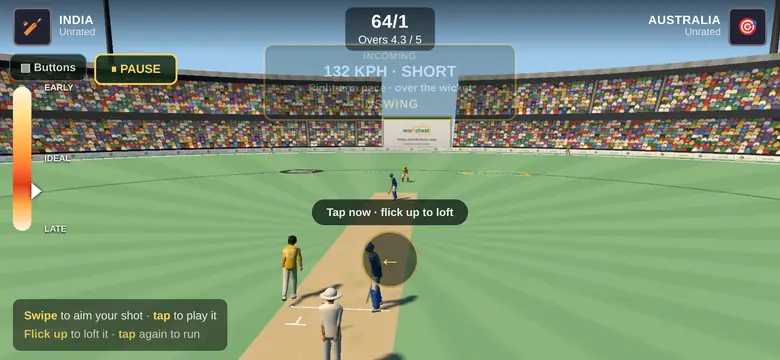
The game on a phone held sideways. Same match, same scoreboard - different hands.
Turn it sideways
Cricket needs the width. You have to be able to see the field you are hitting into, and a phone held upright shows you a corridor. So the first thing the game does on a phone is ask you to rotate, and the moment you do it goes fullscreen and holds the screen awake for the rest of the match - no more losing a delivery because the display dimmed mid-over.
Batting: swipe, tap, flick
Every keyboard input in this game is either a direction or a moment in time, which is exactly what a touchscreen is good at. So the arrow keys became swipes and the space bar became a tap.
- Swipe in the direction you want to hit. An aim dial appears on the batter showing which way the shot is pointed, so you can see what you have chosen before the ball gets there.
- Tap to play it. Timing is the whole game - the dial down the left edge tells you whether you were early, ideal or late.
- Flick up instead of a flat swipe and you loft it. That is the shot that clears the ring, and the shot that gets you caught.
- Tap again while the ball is in the outfield to call the run.
A one-line prompt above your thumb changes with the phase of the ball - "Swipe to aim", then "Tap now - flick up to loft", then "Tap to run" - so you are never guessing what the screen wants from you.
If you would rather have buttons than gestures, there is a Buttons toggle in the top-left corner that puts a four-way pad and a LOFT switch on screen. It remembers your choice between sessions.
Bowling: mark the pitch with your finger
Bowling on a laptop is arrow keys to place the ball, space to lock your pace, then hold an arrow to bend it. On a phone:
- Touch the pitch strip to mark your line and your length. Drag it around until the marker is where you want the ball to land.
- Hit BOWL IT and run in.
- Tap to lock your pace as the meter sweeps.
- Hold the left or right side of the screen during the run-up to charge the swing, or the turn if you are bowling spin.
The field-setting panel that opens at the start of every over was rebuilt for a small screen too. On a phone it used to be a 340-pixel circle on a 390-pixel-tall display, which squashed the ground into an ellipse and pushed the confirm button off the bottom edge. Now the diagram stays a circle, the fielders stay draggable, and CONFIRM sits where a thumb can reach it.
A phone player and a laptop player, in the same match
This is the part that matters. There is one version of Howzat Live and it reads the screen it is opened on - there is no cut-down mobile edition sitting in a corner. Somebody on a phone in Lahore and somebody on a laptop in Karachi can be put in the same match by Quick Match and neither of them has to think about it.
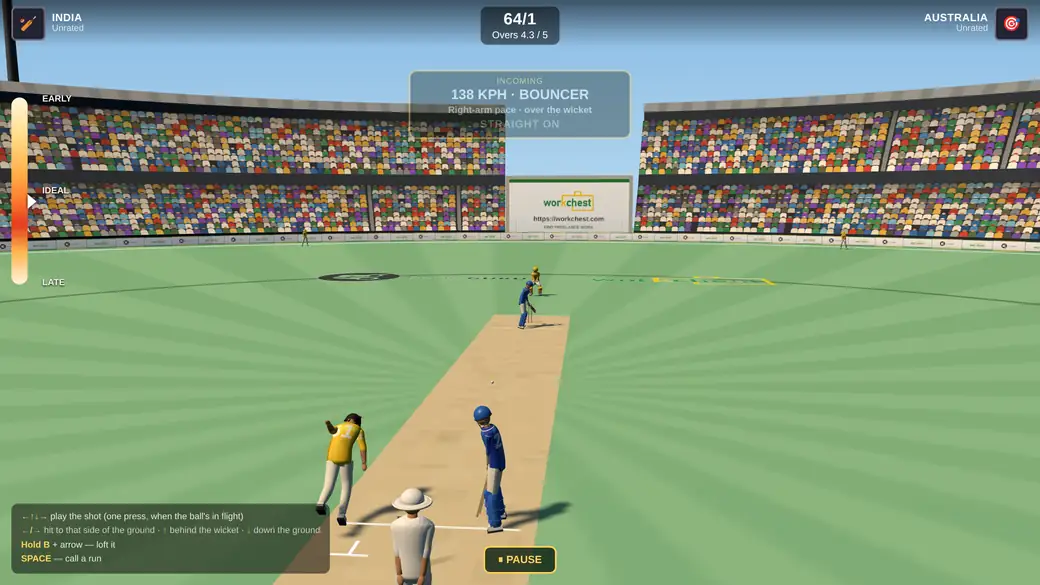
The same match on a laptop. Arrow keys instead of swipes; everything else identical.
We tested that properly rather than assuming it: a desktop client against a phone client, both sides taking a turn at bowling, with the phone deliberately slowed down the way a real handset is. Across the runs, every single ball resolved identically on both screens, the scoreboard never drifted apart, and the batter's stroke was drawn on the bowler's screen on every delivery. Nobody is watching a different game to their opponent.
Nothing was cut for the small screen
The scoreboard, the overs, the incoming-delivery read-out that tells you the pace and the length and which way it is going to move, the timing dial, the shot map, the in-match chat with its one-tap quick replies - all of it is on the phone. Two collisions that only showed up at phone size are fixed: the pause control no longer sits on top of the RUN button, and the shot legend no longer clips the timing dial.
Phones also open the game at lighter graphics from the first ball rather than discovering they need to halfway through the toss. That is the difference between a smooth first over and a stuttering one.
Two new rules while we were in there
Two-player matches now have a proper stoppage, and a proper answer to the person who wanders off.
- A pause button, capped at two minutes. Online play had no pause at all before, because a pause that only one machine knows about is just that machine falling behind. The server owns this one: it freezes the ball clock for both players, both screens show the same countdown, only the player who called it can restart early, and play resumes by itself when the two minutes are gone. The button shows what you have left.
- Two minutes of silence forfeits the match. If a player stops playing, their opponent no longer has to sit there bowling at nobody until the overs run out. Both sides get a warning with thirty seconds left, so it is never a surprise - and if you are still there, pressing anything clears it.
Start playing
Create a free account, pick the country you want beside your name, and hit Quick Match in the lobby. On a phone: turn it sideways, swipe to aim, tap to play. Five overs takes about ten minutes.